[Home]CY7C68013 EZ-USB FX2 USB 2.0 Development Kit

HomePage | RecentChanges | Preferences | My Website home page

summary

Ebay suggested I buy one of these.

The way the CY7C68013 boots is interesting and worth exploring.

It provided a few challenges getting the code to build and load. I use a PC with the Raspberry Pi linux.

http://www.dougrice.plus.com/dev/cypress/notes_dhr.txt has some notes about the challenges.

The site below is really useful.

https://www.triplespark.net/elec/periph/USB-FX2/software/

As it is possible to use "sudo apt-get -y install cycfx2prog" , I have a working cycfx2prog.

The examples need some modifications to use the SDCC compiler.

I can build the examples from https://github.com/djmuhlestein/fx2lib

The examples are for the CY3864 development board so the lights.c does not work on the eBay board.

( https://www.manualslib.com/manual/1317355/Cypress-Cy3684.html?page=114#manual )

I can replace lights.c to use PA so I can use the board from ebay.

http://www.dougrice.plus.com/dev/cypress/lights.c.txt

and

http://www.dougrice.plus.com/dev/cypress/lightsTimer.c - does bit banged serial using timer interrupts for debug.

I cannot get fx2load to work but I can use cycfx2prog to load and run the .ihx files.

 cycfx2prog prg:lights.ihx run

Cypress was brought out by:

https://www.infineon.com/products/universal-serial-bus/usb-2-0-peripheral-controllers/ez-usb-fx2lp-fx2g2-usb-2-0

Logic Analyser based on CY7C68013 EZ-USB FX2 USB 2.0 Development Kit

I brought a little logic analyser off eBay.

it uses the CY7C68013

It can be used with https://sigrok.org/wiki/Main_Page
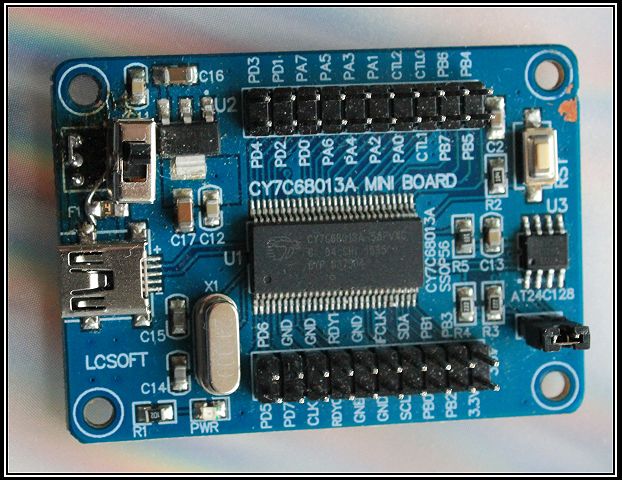
http://www.dougrice.plus.com/dev/cypress/i2c.c - has notes to reprogram AT24C128 using CY7C68013 so it can be used as the logic analyser.

Note: The Analyser has some input protection.

CY7C68013 EZ-USB FX2 USB 2.0 Development Kit

Ebay suggested I buy another one of these. it has a dark PCB and black lettering. It has two LED connected to PA and a Link to enable them.

https://wiki.geeetech.com/index.php/CY7C68013 has a picture of a similar board with the two LED.

The link used to map the AT24C128 16K iic EEPROM works differently for each board.

I was looking for a microprocessor that did not boot from internal FLASH memory!

It has a an 8051 core, but the board only has the 56-pin chip that does not expose the serial port pins.

pi@raspberrypi:~ $ lsusb

Bus 001 Device 009: ID 04b4:8613 Cypress Semiconductor Corp. CY7C68013 EZ-USB FX2 USB 2.0 Development Kit

http://www.dougrice.plus.com/dev/cypress/notes_dhr.txt - my notes to help me remember.

http://www.dougrice.plus.com/dev/cypress

It is possible to use SDCC to compile a program, upload the code and reboot the board.

The CY7C68013 has a bootloader that downloads the VID:PID and code from an external eeprom.

The link below is useful for building, but the examples don't work for my boards:-

https://github.com/djmuhlestein/fx2lib

The original lights.c was really simple program that cycles the lights on the CY3864 development board. The LED are not directly connected to the 8051 ports.

I could not get the python scripts to install. They report "cannot import _fx2"

https://www.triplespark.net/elec/periph/USB-FX2/software/

CycFX2Prog?: FX2 Programming Tool - I could do "sudo apt install" it but building it now needs some work.

https://installati.one/install-cycfx2prog-ubuntu-22-04/

 sudo apt-get -y install cycfx2prog

It reports cycfx2prog is the newest version (0.47-1.1).

I could not get the code from https://www.triplespark.net/elec/periph/USB-FX2/software to link.

The code compiles but reports missing symbols.

https://tracker.debian.org/pkg/cycfx2prog

https://packages.debian.org/source/stable/cycfx2prog has the make file fixes in the diff.

It needs the make file updating, so that -lusb is at the end.

 LIBS = -lusb

 $(CC) cycfx2prog.o cycfx2dev.o -o cycfx2prog $(LIBS)

It is possible to use "sudo apt-get -y install cycfx2prog"

I have a working cycfx2prog.

So I can build the examples using https://github.com/djmuhlestein/fx2lib

I can replace lights.c to use PA

The original lights.C was really simple program that cycles the lights on the CY3864 development board. ( https://www.manualslib.com/manual/1317355/Cypress-Cy3684.html?page=114#manual )

and use cycfx2prog to load

 cycfx2prog prg:i2c.ihx run

Add this to the Makefile

 .PHONY:run
 run: ./build/$(BASENAME).ihx
	sudo cycfx2prog prg:./build/$(BASENAME).ihx run

So you can type

 make run

Booting the CY7C68013

The CY7C68013 has a default bootloader built in.

It looks for an iic eeprom at 0x51 and read the first byte. The board has a link that can disable this.

  1. if C0 VID PID - boot from USB lead.
  2. if C2 VID PID code - download code from eeprom and reset to run it.
  3. else eprom content not code, so use default VID:PID

If the CY7C68013 boots from the eeprom, the eeprom needs programming using the iic format.

There is a tool: ( https://github.com/djmuhlestein/fx2lib )

 python ihx2iic.py build/lights.ihx lights.iic

The CY7C68013 can program the AT24L128 using it's iic peripheral.

I can use a RaspberryPi? to upload code into the iic EEPROM

On the eBay Boards, I can use a RaspberryPi? to program the iic device using the IIC bus.

 RaspberryPi? --iic-- CY7C68013 board.

http://www.dougrice.plus.com/dev/cypress/ri2ceprom_rpi_24LC128_0x51_.c

Later on the code below could use the CY7C68013 to reprogram the AT24L128.

http://www.dougrice.plus.com/dev/cypress/i2c.c - reprogram AT24C128 using CY7C68013

The chip on the board does not have the pins for the 8051's serial peripherals so I had to bit bang a serial in i2c.c

https://www.triplespark.net/elec/periph/USB-FX2/software/ has cycfx2prog-0.47

pi@raspberrypi:~/Desktop?/cypress/cycfx2prog-0.47 $ ./cycfx2prog prg:i2c.ihx

pi@raspberrypi:~/Desktop?/cypress/cycfx2prog-0.47 $ ./cycfx2prog run

http://www.dougrice.plus.com/dev/cypress/lightsTimer.c has the bit banged 1200 baud serial used for debug. Connect the 3.3 volt serial lead to PA0.

Useful Links and webpages

Use the SDCC compiler: http://sdcc.sourceforge.net/

This WIKI is useful.

http://www.geeetech.com/wiki/index.php/CY7C68013 - two LED connected to PA0 and PA1

The is useful for building, but the examples were not written for my eBay boards. They build and can be modified:-

https://github.com/djmuhlestein/fx2lib

The examples are for the the CY3864 development board, but they build using SDCC.

http://www.dougrice.plus.com/dev/cypress/lights.c.txt replaces the example that can count output to PA.

  // one of the boards from ebay has LEDs on PA. It has a dark blue PCB and black writing
  //The? original lights.C was really simple program that cycles the lights on the CY3864 development board.
  // the original example has LEDS on a separate IC, so the code below does not work for the boards from ebay. 
  // This is for a different board to the ones I brough from ebay.
  // The CY3864 board has a GAL chip that turns on or off the LED when memory locations are read by IO instructions.
  // volatile __xdata BYTE* bytes[] = { &D2ON, &D3ON, &D4ON, &D5ON, &D2OFF, &D3OFF, &D4OFF, &D5OFF };

 // One of my boards has LEDs on PA. 
 // make PA outputs
 // count up slowly and output to PA
 // connect an LED and resistor to a PA pin

 void main(void)
 {
    volatile BYTE tmp;
	BYTE cur=0;
	BYTE count = 0;
	OEA =0xff;  // make PA outputs

        // loop endlessly
        for(;;) {
		IOA = count;  // output count to PA
		count--;
        delay(100);

    }
 }

http://www.dougrice.plus.com/dev/cypress/i2c.c has a lot of code.

http://www.dougrice.plus.com/dev/cypress/notes_dhr.txt to help me remember.

http://www.dougrice.plus.com/dev/cypress/lightsTimer.c has a bit_banged putchar() used in printf() used for debug.

/*

 *********************************************
 * SEC 0 - Serial using bitbang and timer
 *********************************************
 */
 volatile unsigned char sendcounter;
 volatile unsigned int senddata;
 volatile _Bool sending;

 void send_bit(void) __interrupt(3)
 {
	//reload and count up to 0.
	// 2^16
	//
	// 1200 baud = 0.83ms
	// 
	// Count up from - 833 to 00
	// ticks at 1us ticks?
	//
	TH1 = ( 65536 - BITDELAY ) / 256;
	TL1 = ( 65536 - BITDELAY ) % 256;

	if(!sending)
		return;

	IOA = senddata & 1;
	senddata >>= 1;

	if(!--sendcounter)
	{
		sending = false;
		IE &= ~0x08;
	}
 }

 //int putchar(int c)
 void putchar(char c)
 {

    // if still busy , wait.
    while(sending); // block while busy.

    // there is no UART on 56 pin device.
    // set up START bit,byte, stop bit
    // S01234567s 
	// use timer and interupt to clock out the bit
	// OR start and Stop bits    
	senddata = ( c << 1 ) | 0x200;
	sendcounter = 10; // send  START bit + 8 bits + stop bit
	sending = true;
	IE |= 0x08;
 }

Others:-

https://github.com/makestuff/fx2tools

https://github.com/makestuff/libfx2loader

Some links with useful information

https://peterelectronics.blogspot.com/2011/12/cy7c68013a-usb.html

http://www.colecovision.eu/mcs51/CY7C68013A%20EZ-USB%20FX2LP%20USB2.0%20Development%20Board%20Serial.shtml

http://allmybrain.com/2008/10/24/a-few-open-source-tips-for-the-cypress-fx2lp-ez-usb-cy7c68013a/

Conclusion

The way the CY7C68013 boots is interesting and worth exploring.

It provided a few challenges getting the code to build and load.

The site below is really useful. Problems with __ in include files.

https://www.triplespark.net/elec/periph/USB-FX2/software/

As it is possible to use "sudo apt-get -y install cycfx2prog" I have a working cycfx2prog.

so I can build the examples from https://github.com/djmuhlestein/fx2lib

I can replace lights.c to use PA

I cannot get fx2load to work but I can use cycfx2prog to load and run the .ihx files.

sudo cycfx2prog prg:lights.ihx run

I copied a makefile from https://www.triplespark.net/elec/periph/USB-FX2/software/local_examples.html#convert_string

Add this to the Makefile

 .PHONY:run
 run: ./build/$(BASENAME).ihx
	sudo cycfx2prog prg:./build/$(BASENAME).ihx run

So you can type

 make run

The little logic analyser is excellent.

The blue boards from ebay are interesting.

The Arduino Leonardo and Raspberry Pico are great ways to do a USB HID keyboard that could be used to automate typing to test an App.

http://ccgi.dougrice.plus.com/cgi-bin/wiki.pl?AutoType


HomePage | RecentChanges | Preferences | My Website home page
This page is read-only | View other revisions
Last edited August 13, 2025 10:18 am by dougrice.plus.com (diff)
Search: