http://www.dougrice.plus.com/dev/graphs/resizeImage.html - resize image in a web page
http://www.dougrice.plus.com/dev/graphs/resizeImage1.html - resize image in a web page with added negative button
http://www.dougrice.plus.com/dev/graphs/resizeImage2.html - resize image in a web page
https://wavedrom.com/tutorial.html
https://www.circuit-diagram.org/editor/
https://www.qsl.net/wd9eyb/klunky/home.html
http://www.cuneytyilmaz.com/prog/jrx/jrx.nongecko.html#
draw.io https://app.diagrams.net/
https://svg-edit.github.io/svgedit/
https://www.rapidtables.com/tools/pie-chart.html
https://www.w3schools.com/colors/colors_mixer.asp
https://docs.wokwi.com/?utm_source=wokwi - multi board simulator
http://www.dougrice.plus.com/nascom2/JavaScriptNascom2/jsnascom.html - nascom 2
http://www.dougrice.plus.com/g.htm
https://www.sitepoint.com/best-javascript-charting-libraries/
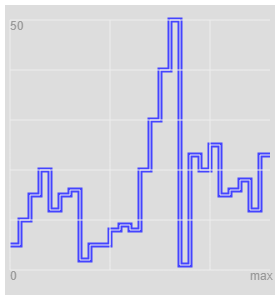
HTML has the canvas tag which needs JavaScript? to plot graphs.
These light weight in-line graphs use JavaScript? and the Canvas tags. They are examples.
file:///C:/Users/dough/Desktop/graph1sampleX2.htm
http://www.dougrice.plus.com/dev/graphs/graph1sampleX2.htm - split reading pairs and plot 2 lines.
http://www.dougrice.plus.com/dev/graphs/graph1sample.htm - experimental Bar Chart, line and step line.
http://www.dougrice.plus.com/dev/graphs/graph1sample1.htm - experimental Bar Chart, line and step line.
http://www.dougrice.plus.com/dev/graphs/graph1sample2.htm - modified to add a sample on a timer tick
http://www.dougrice.plus.com/dev/graphs/graph1sample3.htm - Try some axis and ticks
http://www.dougrice.plus.com/dev/graphs/graph1sample4.htm - Try some axis and ticks and lables and rotated lables.
http://www.dougrice.plus.com/dougnapTheory/graph1sampleZandFilter.htm - plotting Z and filter response
http://www.dougrice.plus.com/dev/graphs/graphPi.htm - Plot DS18S20 measurements from two Raspberry Pi
http://www.dougrice.plus.com/dev/graphs/graph1pie.htm - experimental Pie Chart
http://www.dougrice.plus.com/dev/graphs/graph1nodes.htm - animation. Tips: Use a semi translucent rectangle to fade the graph.
http://www.dougrice.plus.com/dev/graphs/graph1portLed.htm - Thommy Thorn used a canvas for his Nascom 2 web page.
http://www.dougrice.plus.com/dev/graphs/graph1diagrams.htm - Drawing diagrams Using styles and CANVAS experiment.
http://www.dougrice.plus.com/dev/graphs/plot.htm -
http://www.dougrice.plus.com/dev/graphs/plotCurl.htm
http://www.dougrice.plus.com/dev/graphs/plotCurlColour.htm - colour chart
http://www.dougrice.plus.com/dev/graphs/t_clock.htm - canvas LED ring
I was told about FLOT a long time ago: https://www.flotcharts.org/
Using FLOT: http://www.dougrice.plus.com/dev/dtmfCode/pcm2/flotscope.htm
This page uses flot. It models telephone lines and shows the results as an animation:- http://www.dougrice.plus.com/dougnapTheory/flot/a_artline4W.htm
http://tandy.wiki/CGP-115 - In the early 1980's this little plotter was sensational. I had a go at emulating it on a web page.
http://www.dougrice.plus.com/dev/UART/UART2_Plotter.htm
https://homepages.plus.net/dougrice./dev/UART/UART2_PlotterSerial.htm
Here are some GraphThoughts
http://www.dougrice.plus.com/dev/graphs/buggy.htm
http://www.dougrice.plus.com/dev/graphs/buggyLayers.htm