One day during Covid, I was working from home, and the App I was testing, kept dropping out.
I thought I needed to soak test it to find out what caused it. It needed a stream of typing to load it, and find those time critical events where a lock is needed.
The drop outs in the app were due to features of the software that triggered a another call to the cold start code. It starting multiple instances of an object, that were unexpected.
The App is used for the service summarised by this picture, which I annotated:-
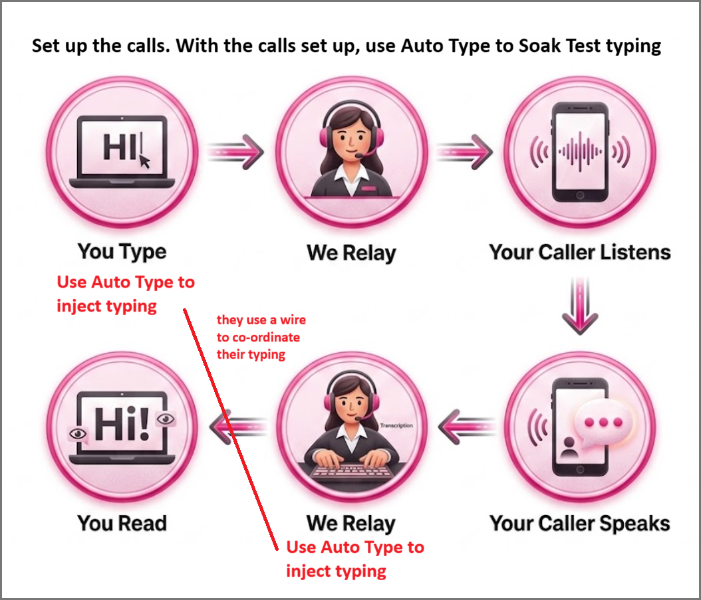
It was redrawn by AI based on this image

Automation would need a robot that can see , recognise what it is looking at and react.
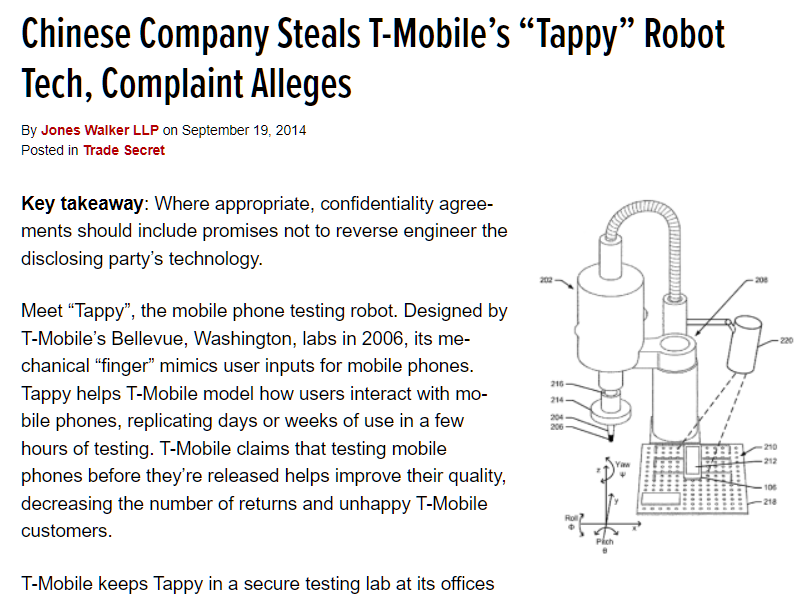
https://www.tradesecretsinsider.com/chinese-company-steals-t-mobiles-tappy-robot-tech-complaint-alleges/ - The 500 million pound law suit.
https://robdobson.com/2016/05/play2048witharobotarm/ has some interesting insights
In the past, eBay had suggested I buy some DigiSpark? for less than 2 GPB and they could be used with the Arduino IDE. Great for the model railway projects.
One Arduino example was a HID - Keyboard. I could modify the example to slowly type at the speed I thought the users would tap away on the App's soft keyboard.
Arduino Leonardo and Raspberry PICO also have examples for USB Keyboard and USB mouse.
The USB Keyboard examples send keystrokes to where the Input caret is. Before enabling the typing, the user needs to position the cursor and click on the input box to position the input carat.
The USB mouse examples send increments, but the Arduino Leonardo / Raspberry PICO device does not know where the mouse is.
You would need to move the mouse pointer over the App and Soft Keyboard and use mouse clicks.
This really needs the user to look at the device and screen and see where the mouse pointer is and move it to where it needs to be.
The mouse examples do not know how to map letters to mouse movements on the many soft keyboards.
This is a challenge without machine vision.
Automation could be simplified if an agreed sequence of keystrokes triggered test events.
Here I use three AutoType devices. The workstation used by the Relay advisor is off-screen.
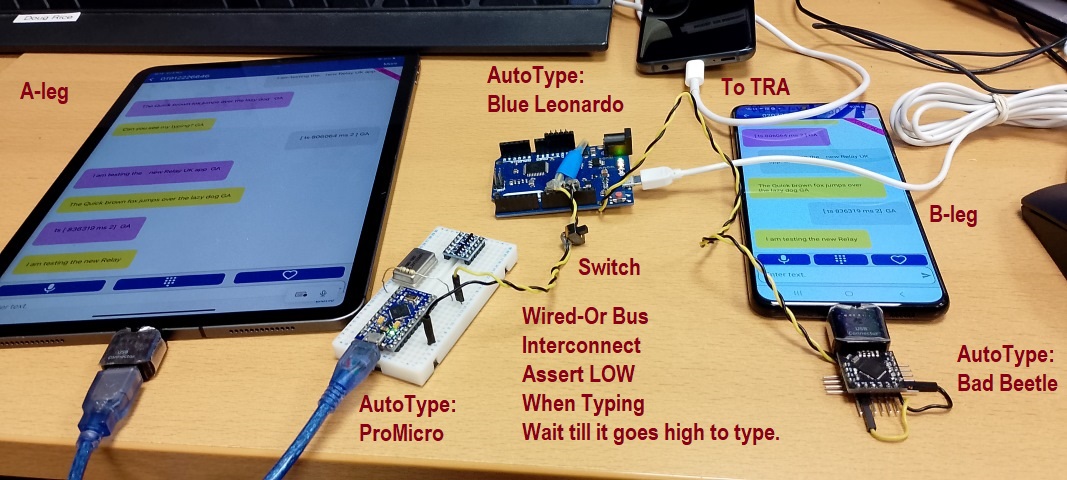
The devices in the picture are based on the Arduino Leonardo. The user has to manually set up so the typing goes into the correct input box. Then turn on the typing using the switch or plugging in the AutoType devices. The yellow/black wire has a switch that can be used to turn the typing on and off. It assumes the apps being testing work! The Arduino Leonardo can also be used as a games controller or mouse. To be tried but it will be hard work!
They are possibly using this sketch:
You can also use Raspberry PICO
http://www.dougrice.plus.com/dev/DigiSpark/KeyboardRP2/KeyboardRP2.ino
It can be configured for different devices.
 // define DIGISPARK for DIGISPARK, else Arduino LEONARDO
 #define nDIGISPARK
 #define nLEONARDO
 #define RP2PICO
History has muddled up the code. NOTE: They use Active-low Wired-OR.
While TYPING, the devices assert low on the interconnect wires, and goes HIGH when it is IDLE.
The other devices hold off starting typing until TYPING goes HIGH.
    // when TYPING goes high, the device has finished typing,
    // the other devices can poll to see if they can start.
    // Assert LOW while typing, so HIGH means IDLE.
    if ( digitalRead( TYPING ) ){
      waiting = false;
    }
A Raspberry Pico can also be used.
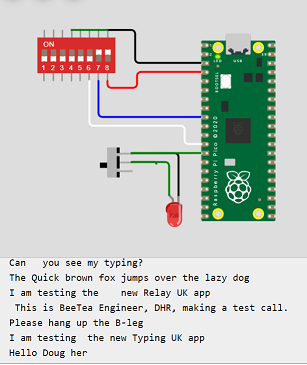
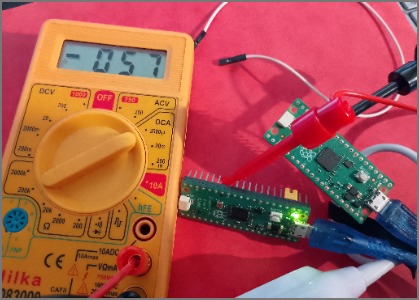
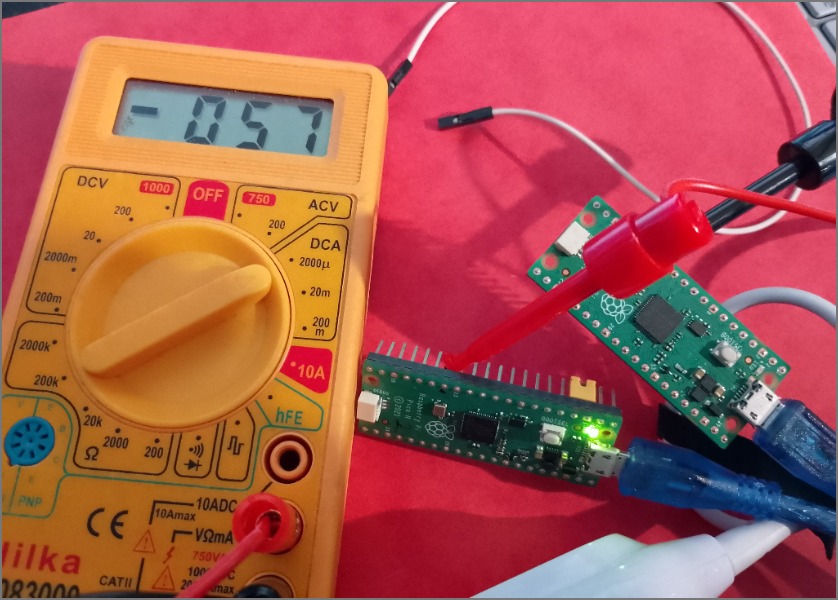
A wire is used to the PICO co-ordinate typing using a wired or bus.

NOTE: Be careful not to mix 3v3 and 5 volt devices and make sure there are protection resistors to prevent latch up.
You can get latchup if a powered device's output is connected to an input on a device that is not powered up.
This is a pragmatic solution, that allowed repetative typing for as long as I could leave it set up. One call went to over three hours.
There is a switch that is used to turn the typing on and off.
I asked an AI tool to draw me a Raspberry Pico typing into a computer, and it presented this:
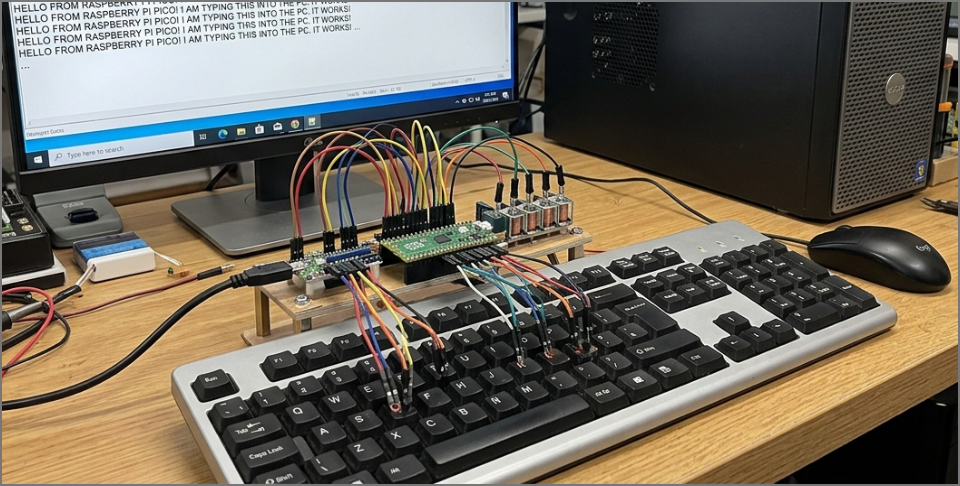
This is my photo of two Raspberry Pico typing in turn over as two USB HID keyboard.
The white wire is an Active Low wired-or bus, used so they type in turn. The one typing asserts a low, and the other one holds off starting typing.
As a test, I plugged two Raspberry PICO typed into a USB hub plugged to my PC and typed into the same notepad session.
Without the Wired-Or bus, they type together. Use the Wired-or buss so they need to type in turn. Use a pause after typing so the other devices get a turn.
( TYPING ) ( AWAITING to TYPE )
I used a multimeter to measure the current on the white wire. It was 57 micro amps.
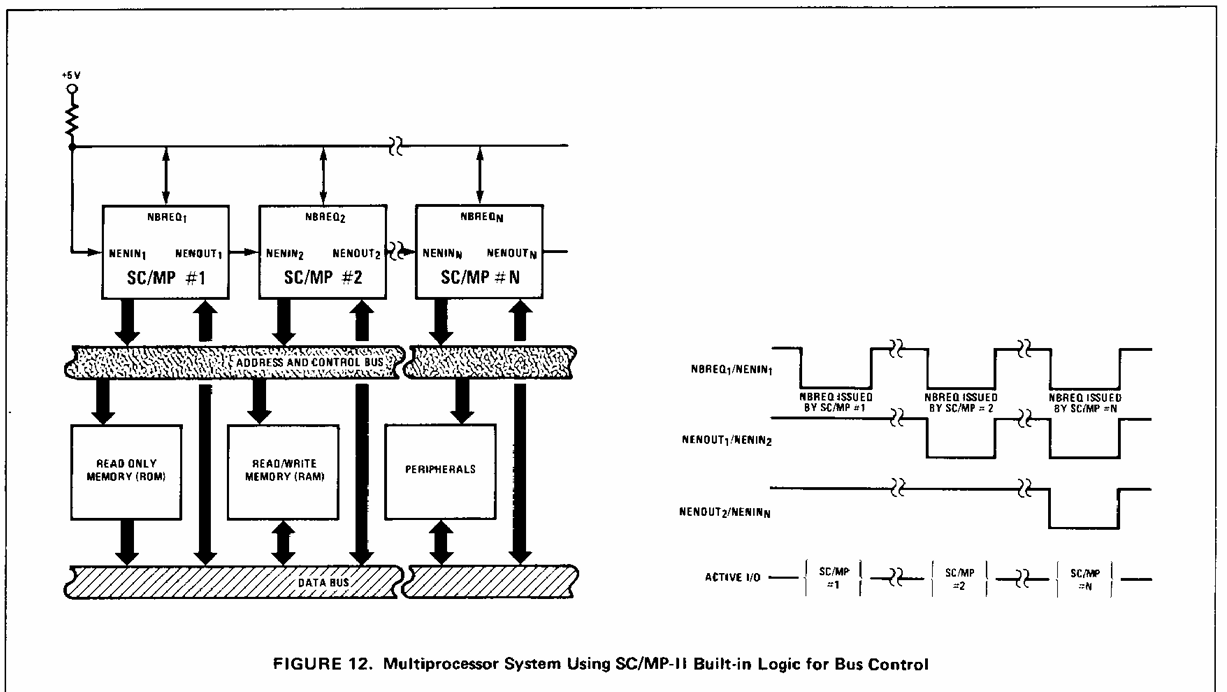
This is based on the National SC/MP datasheet using in the MK14.
Without the Wired-Or bus, they type together, so they need to type in turn.
( TYPING ) ( AWAITING to TYPE )
 While True {
   ( Assert low while typing )
   ( pause a bit )
   ( Await for bus to go idle )
}
A smartphone user uses sight to guide them to press the correct areas of the screen.
This is a BIG challenge, probably best avoided.
Robots that automate smart phone apps need machine vision to confirm what they are seeing, so they correctly position the dabber.
The obvious solution would require a robot like Rob Dobson's robot.
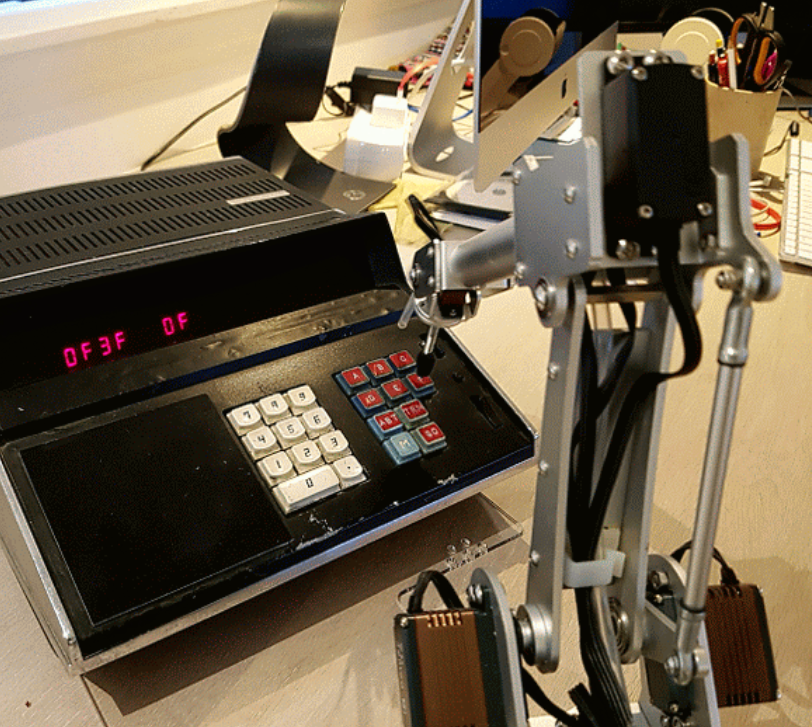
Dabbing on a soft keyboard would need a robot, which I did not have in my hobby box!
Rob Dobson has a really good video https://robdobson.com/2016/10/mk14-meets-7bot on his blog, using a robot to press keys on his MK 14 computer.
He also has this article that has information about machine vision: https://robdobson.com/2016/05/play2048witharobotarm/ It shows a robot pressing keys on a smartphone app, and worth a read.
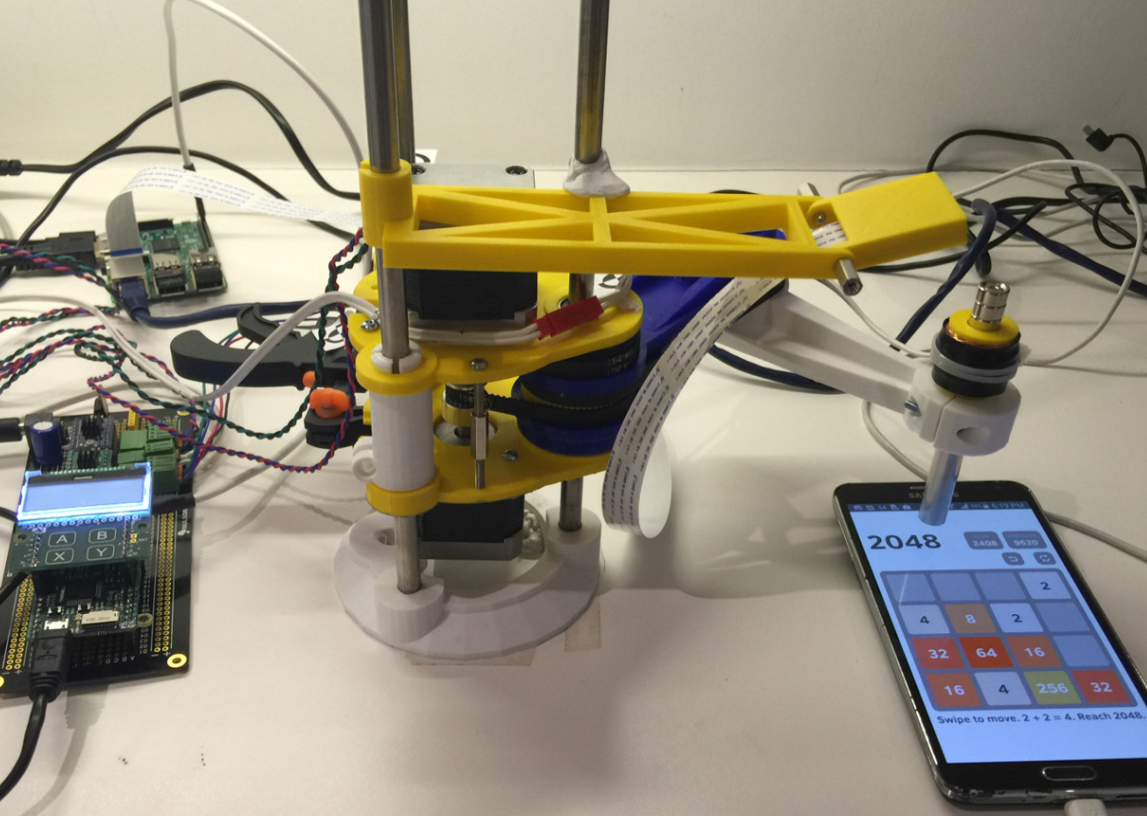
I asked Gemini to draw me a picture and it came up with:
Trying to work out how to get a PICO to actually press the keys on the SmartPhone? soft keypad is still a big challenge.
On a PC, you can have more than one keyboard and the key strokes are merged, and generating keystrokes with a device emulating a keyboard is what these pages are about.
On a Smartphone, you can plug in an external keyboard and mouse using an OTG cable.
T-mobile thought their robot was worth a lot more than my 5 pound Raspberry Pico.
AutoTypeWorkMoreNotes has some more related notes and challenges.
You can use an external keyboard and mouse plugged into an OTG cable plugged into a smart phone.
I had read that it is possible to use an Arduino Leonardo as a keyboard.
The Arduino Leonardo have an example for HID keyboard and mouse.
I was aware of the Arduino Leonardo, but at 25 GPB, they were on my aspire to purchase list.
Here are some of my devices:-
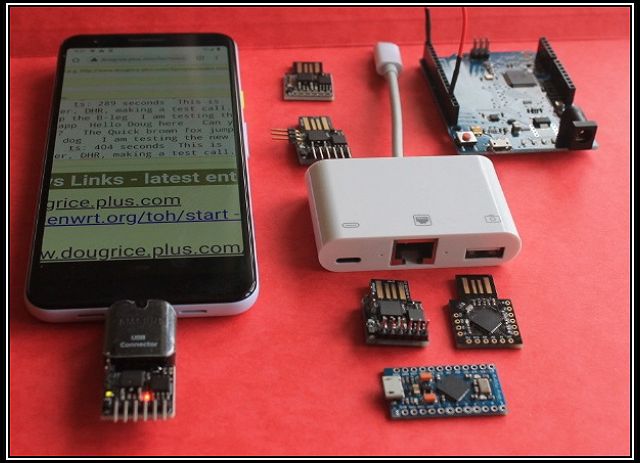
and
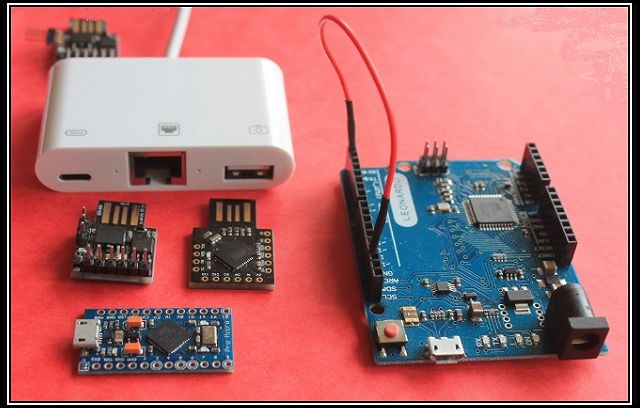
The Raspberry Pico can also be used with the Arduino IDE, and I could self fund those for work. Thanks Raspberry Pi foundation.
Automation is really difficult. However, I could set up the calls manually, and leave my AutoType devices typing away over lunch.
To emulate what a real person does requires a real human brain to respond to the unexpected events
A lot of task automation seems to be a "robot" follows a sequence of steps "blind" with limited ability to react to what actually happens.
The drop outs in the app were due to features of the software that triggered a another call to the cold start code.
My external keyboard slid off my lap, causing me to press the "escape" key, and it triggered the drop out!
Another problem with automation is that the physical interfaces are difficult to automate to summarise down to events for asserts required for the test's pass / fail criteria.
SmartPhones? need a robot with a dabbler and some video and vision analysis to provide feedback. See:
Security also gets in the way. Also you are not allowed to connect "non-approved" devices, and my automation tools are "non-approved" as I am inventing them as I develop them!
I brought a USB-A to lighting OTG cable dongle, that did not have the Apple chip it it, and it only worked for a minute or two before it was detected.
For a short while it was possible to buy the white dongle in the picture above, that allowed my Apple phones to be charged while I used my AutoTyping devices.
So automation is limited to a limited set of pragmatic solutions. This is one of them.
When the law gets involved elsewhere:-
My AutoType is like two news presenters, it types in turn and uses an "active-low wired-or" bus to co-ordinate who is typing.
It's Blind Typing to test the apps for the Deaf and speech impaired.
To make phone calls, the deaf community and speech impaired may use a textphone to TYPE and READ what that want to say.
The relay operator SPEAK and HEAR with the VOICE telephone user.
A user of the Relay UK App TYPES what they want to say while the Relay Advisor TYPES the responses from the VOICE user.
This call should work for as long as the callers want to talk. It could be a over an hour.
Long duration soak test calls needs typing approximating real Relay calls.
BT used to have a robot to test the Payphones, and an obvious solution would be to use a robot like this:
https://www.testdevlab.com/blog/how-we-built-a-robot-for-automated-manual-mobile-testing
Rob Dobson has a really good video https://robdobson.com/2016/10/mk14-meets-7bot/?shared=email&msg=fail on his blog, using a robot to press keys on his MK 14 computer.
This webpage is about how to use some automated USB keyboards to automate typing during a long duration test call testing the Text Relay App.
A test call is set up manually and then the automated typing is enabled for the duration of the test call.
This solution is a "SMART" automation tool ( adapted from SMART goals. )
 SMART stands for:
 * Specific: - A solution to enable text to be typed back and forth exists.
 * Measurable: - repeating text that can be seen in call logs
 * Achievable: - Tools are available so a realistic goal that can be accomplished.
 * Relevant: - fullfils the need to send a stream of characters back and forth
 * Time-bound: Set a deadline for achieving the goal. The proof of concept can take as little as two hours to demonstrate.
Some limitations are discussed later.
The automated keyboards can use Arduino Leonardos, DigiSparks, or Raspberry PICO.
They can be programmed as a USB Keyboards to type a repeating set of phrases during long duration Text Relay test calls.
The deaf community use a textphone to TYPE and READ and a relay operator SPEAK and HEAR.
Users can now use a smartphone App to TYPE and READ.
Some users use a combination of TYPE and READ and SPEAK and HEAR.
The Relay Advisors use a Workstation and READ off an LCD screen and TYPE using a keyboard and mouse
For the TextRelay?, the TYPE and READ user and Advisor use a keyboard to communicate, hopefully in turn.
Long duration calls would normally have typing back and forth between the users via the Relay Advisor.
The users look at the screen to select the input box where the keystrokes go.
When it is their turn they type a phrase, pressing GA at the end.
The Advisor reads out the typing and types what they hear, word by word.
Quite how a real conversation takes turn, requires the parties to "listen" for a clue that it is their turn to type.
To simplify this, the users can type GA - "Go Ahead".
Automating this has many challenges, solved by work arounds.
How does your simple automation tool read a smartphone screen or press buttons on the on screen keyboard?
How does the automation "hear" the GA?
What is available?
The Arduino Leonardo can be programmed as a USB Keyboard.
https://docs.arduino.cc/language-reference/en/functions/usb/Keyboard/
The Arduino Leonardo can also be programmed as a USB Keyboard and mouse, and it has digital inputs and outputs and serial ports.
The USB keyboard cannot "hear" the other end or read what they are typing to wait for GA or a pause.
The Arduino Leonardo have inputs and outputs which can be used to enable and co-ordinate when they are typing.
The devices are connected together using a "Wired-AND/OR" bus. When IDLE, set the pin to INPUT_PULLUP.
So the AutoType devices asserts OUTPUT LOW while it is typing and removes this assert when it stops typing and goes IDLE. After a pause, it holds off starting to type until it sees IDLE.
A switch can also assert a LOW to holdoff typing the next phrase.
Use one for the User and another one for the Advisor.
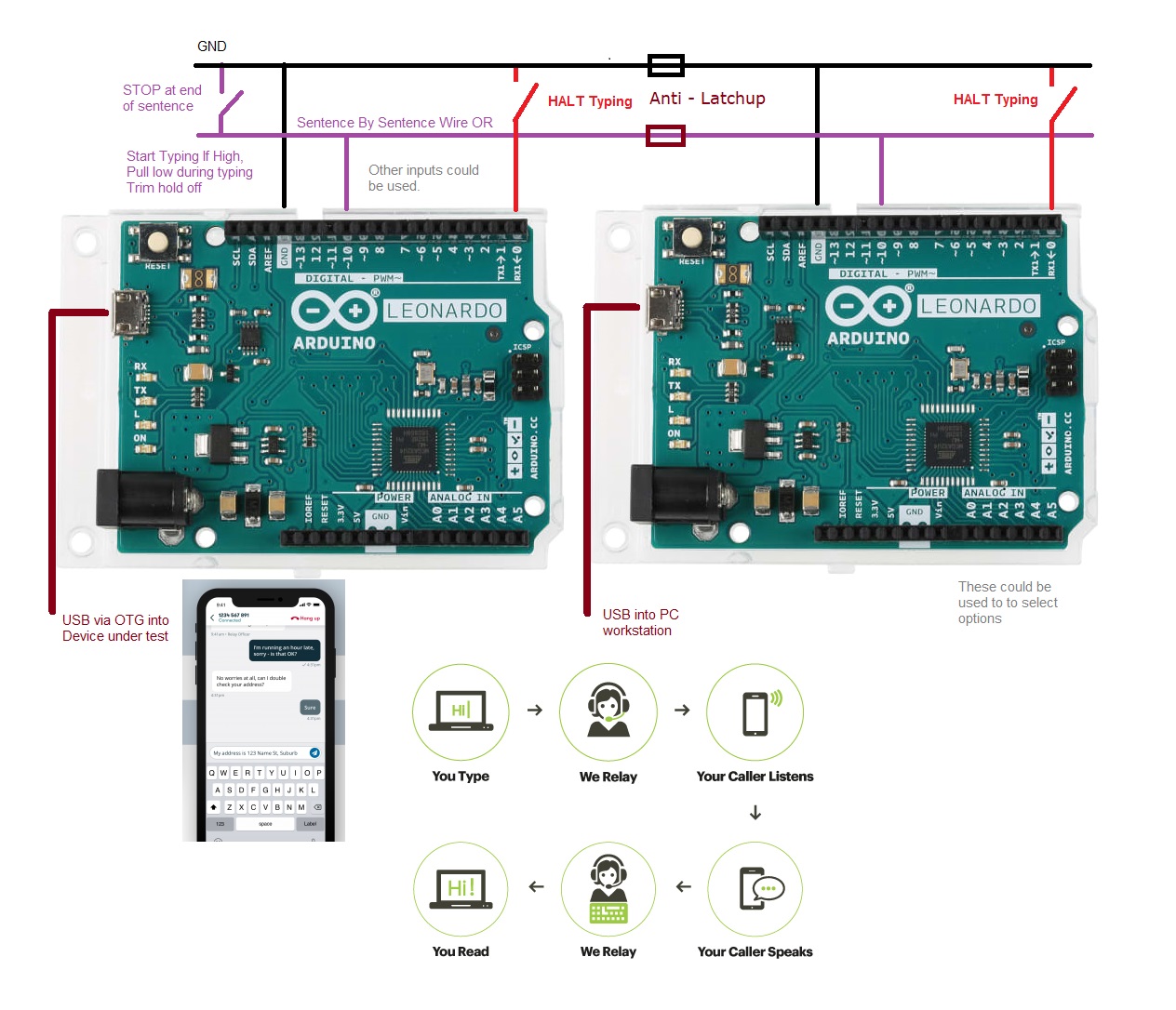
An Arduino Leonardo, Raspberry PICO, and DigiSpark? can be programmed to press keys on a keyboard
You need to use the mouse to select the input box that you type into, then enable typing.
It is possible to use an external keyboard and OTG cable plugged into a smart phone.
Automating this is possible
Automating these is near impossible
Automation could be simplified if an agreed sequence of keystrokes triggered test events.
Below is a collection of Atmel 32u4 bases Arduino Leonardo and DigiSparks.
A Raspberry Pico can also be used.
The Arduino Leonardo has Keyboard examples.
I brought some DigiSparks off eBay for 1.69 GPB - possibly for a model railway project.
They could be programmed using the Arduino IDE and came with examples.
An OTG cable can be used to plug an external keyboard into a smart phone.
Here are a collection of DigiSparks, Arduino Leonardo and other boards that use the Atmel 32u4 chips that support USB.
There was a need to soak test the App with what ever typing could be acheived, and the DigiSparks and example were available.
These pages write up some notes and ideas.
AutoType - Automating pressing keystrokes using DigiSparks , Arduino Leonardo and Raspberry Pico
DigiSparks - DigiSpark? - https://www.instructables.com/Digispark-DIY-The-smallest-USB-Arduino/
The Arduino documentation had an example that sent keyboard keystrokes.
One example was:
The DigiSpark? also came with a KeyBoard? example.
I modified it, and here is a version just for the DigiSparks.
DigiSpark? sketch ( 2025-09-04 ): http://www.dougrice.plus.com/dev/DigiSpark/digi3/digi3.ino
It types slowly, and a switch connected to input P2 can be used to enable / disable typing the next phrase. Shorting P0 to GND HALTS typing
After you position the cursor and select the input box where you normally type, plug the device in and it starts typing the list of phrases.
You can optionally use two or more DigiSparks connected together so they take turns typing.
They wait for P2 to go IDLE before typing their next phrase.
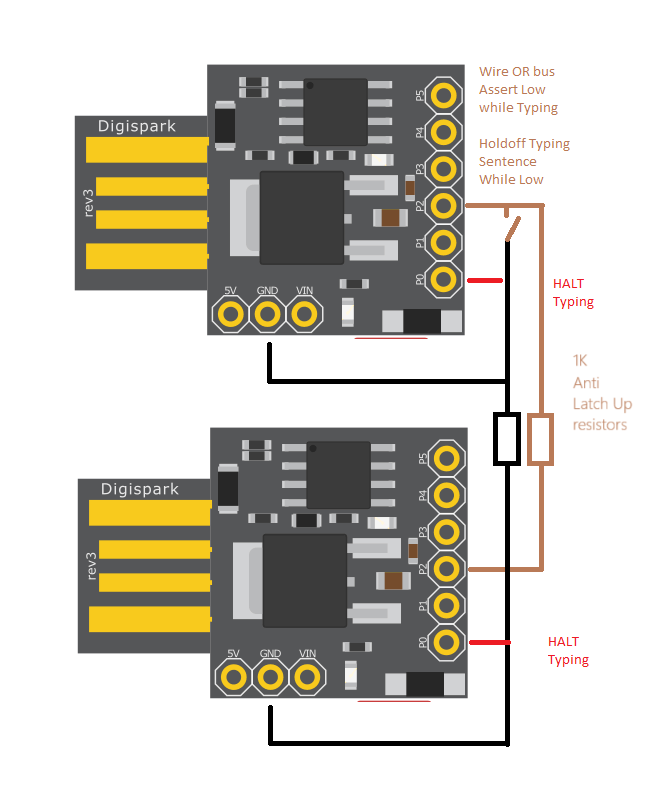
Getting the code to work on the different boards has made it a bit cluttered and over complicated.
 ts: 00009761 ms GA
 This is BeeTea? Engineer, DHR, making a test call.GA
 Please hang up the B-leg GA
 I am testing the new Relay UK app GA
 Hello Doug here GA
  Can you see my typing? GA
  The Quick brown fox jumps over the lazy dog GA
  I am testing the new Relay UK app GA
   ts: 00113746 ms GA
Caller A dials B and has a conversation using TYPE and READ.
Caller A decides to call B
Caller A picks up phone and hears Dial tone
They dial the number and hear ring ring
B heads the ringer and pick up the phone
A hears the ringing stop and B says hello
A says hello and they talk back and forth.
For the TextRelay?, the TYPE and READ user and Advisor use a keyboard to communicate, hopefully in turn.
The script could be coded into a computer and send commands to the dialler and text to speech units.
It would be possible to write a Script and run this on a computer that sent commands to Arduino or Raspberry PICO programmed as Keyboards and the mouse.
To prove the point the Arduino Keyboard example is a good place to start:-
https://docs.arduino.cc/language-reference/en/functions/usb/Keyboard/
At its simplest, a switch to turn the typing on and off and a loop of typing was required. This was acheivable.
The more complicated senario are awaiting developement.
For the TextRelay?, the TYPE and READ user and Advisor use a keyboard to communicate, hopefully in turn.
The automated keyboards cannot read the screens.
Using an Arduino or Raspberry Pico as a Keyboard and a bit of wire to synchronise the two, some automation is possible.
Soak testing of a set up call was possible and this could be left to load up the scroll buffers on the App and Advisor workstations.
The conversation is between two humans, so their needs limit the maximum duration required.
http://www.dougrice.plus.com/dev/DigiSpark/indexImages.htm
Below is a picture of various Atmel 32u4 based Arduino Leonardo variations AutoTyping into the App.
Possibly using this sketch: http://www.dougrice.plus.com/dev/DigiSpark/KeyboardRP2/KeyboardRP2.ino
A textphone using V.21 can be emulated using a USB Modem.
Putty does not provide macros to simplify sending modem commands and reacting to inband text.
However, a web page can be used for test.
https://homepages.plus.net/dougrice./dev/DigiSpark/simpleterm/simpletermModem.html
https://homepages.plus.net/dougrice./dev/DigiSpark/simpleterm/simpletermModemOne.html
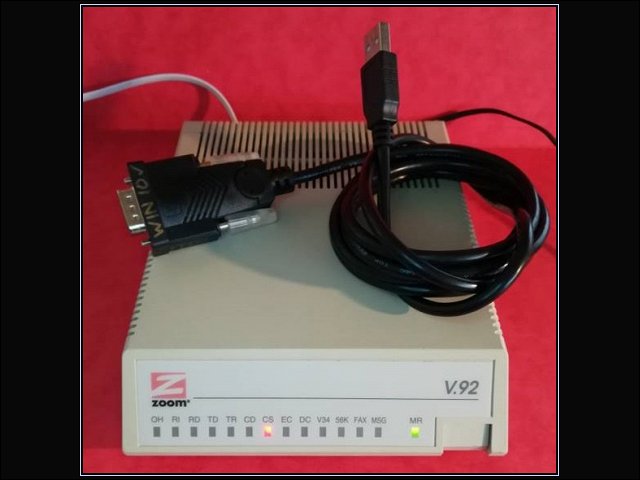
The Arduino Leonardo USB keyboard could be used with the webpage driving the modem. The Webpage could also be enhanced to AutoType, and respond to text from the service.
It would be possible to dial up an announcement and encode the announcement to send modem tones.
The web pages below document some of this.
http://www.dougrice.plus.com/dev/UART/UART2_V18.htm
https://www.dougrice.co.uk/cgi-bin/wiki.pl?WebAudio

Here is a Textphone sending BAUDOT, Frequency Shift Keying is used to send the 5bit code.
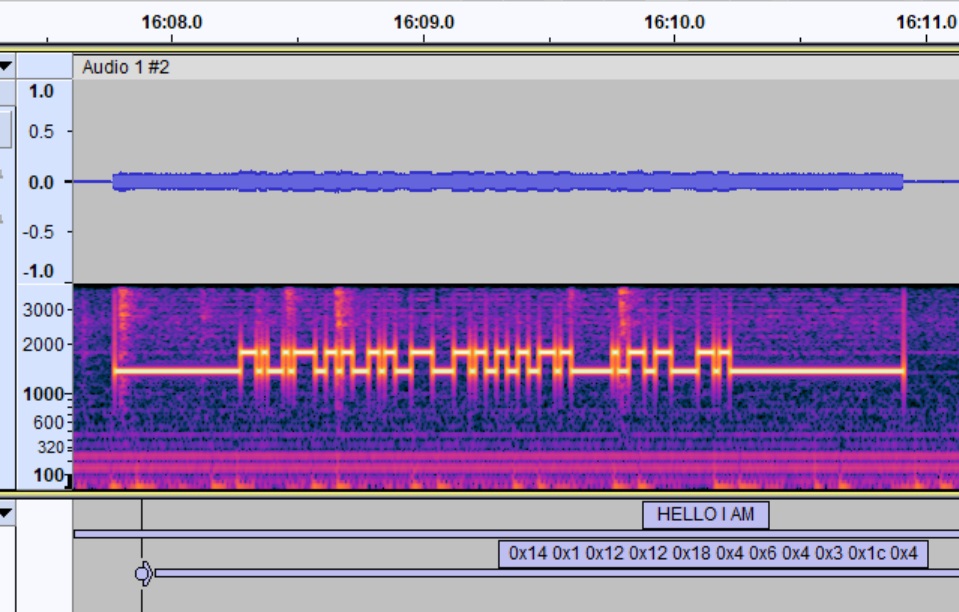
http://www.dougrice.plus.com/dev/UART/UART2_V18.htm has a section "Generate samples tools" that can generate the modem squark used by TextPhones?. It can be used to acoustic couple into a telephone and a TextPhone? can decode it.
Gemini can draw a really good image with credible formatting.
This image shows two Leonardo connected together. It probably will take a bit of time to get it to work!

There are quite a lot of issues that I will need to teach Gemini about.
Keep is Simple!
Testing is a challenge, and having access to logs is one of them.
I used to test signalling and I used to sort the signalling traces.
I came up use a way to statistically analyse the log files. It could automate scanning the logs and report parameter usage.
http://ccgi.dougrice.plus.com/cgi-bin/wiki.pl?Partnumbers_And_Other_Ideas captures some of it.
AutoType provided a pragmatic solution to load up the SamrtPhone? App on multiple different devices of different shapes and sizes.
It did have to break one or two rules and required me to rumage in my hobby box.
It provided many engineering problems, puzzles and challenges which I enjoyed working on