Testing a smart phone apps is a challenge. They are used by users who look at the screen and use a finger or two to interact.
You can plug a mouse into a smartphone, and use it to control the app as well.
Move the mouse and click as well as moving you finger and touching the screen.
It was easy to inject key strokes, this page explores using the same hardware to move the mouse and click.
It is easy to automate the mouse moves and clicks, however, it is REALLY DIFFICULT to do this correctly to control the app being tested.
A smartphone app was being used by the user for this service:
I could use Arduino Leonardo to inject typing , and co-ordinate which Arduino was typing using a simple wire. The switch also allows the typing to be turn on and off as required.
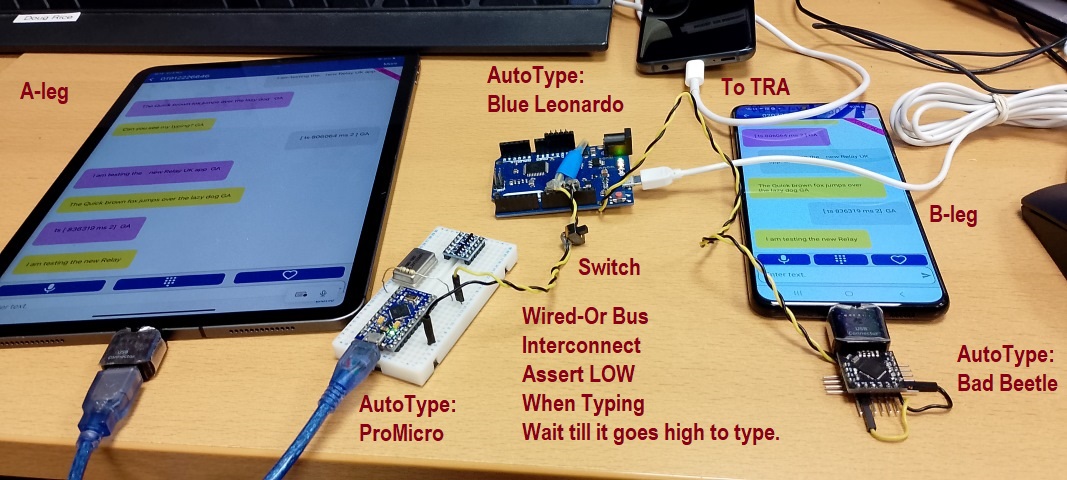
I set the call up, and in the picture above, used my finger to select the input boxes so the input CARET is in the right place.
Once manually set up, I could turn on an automate a stream of typing and they would type in turn. If it kept working, all was well. I could go to lunch and hopefully it was still working when I got back!
It is also possible to program the Arduino Leonardo as a mouse. This is much harder than the keyboard, as the BIG UNKNOWN is how far to move the mose to the next click.
So this page is about exploring using the Arduino Leonardo as a mouse.
You can plug a mouse into a smartphone, and use it to control the app.
Move the mouse and click, as well as touching the screen with the finger.
The big unknown is how far to move the mouse to the next click.
I plugged a mouse using an OTG cable, and you get a cursor and you can click.
I could make the cursor bigs so that it was easier to see.
It is conceiveable that a camera could be used to look at the screen and see the position of the cursor.
https://www.testdevlab.com/blog/how-we-built-a-robot-for-automated-manual-mobile-testing
https://www.iphoneness.com/smart-robots/mobot-smartphone-tester-robot/
Knowing that using robots was not a realistic option in the short term,
Some related pages:
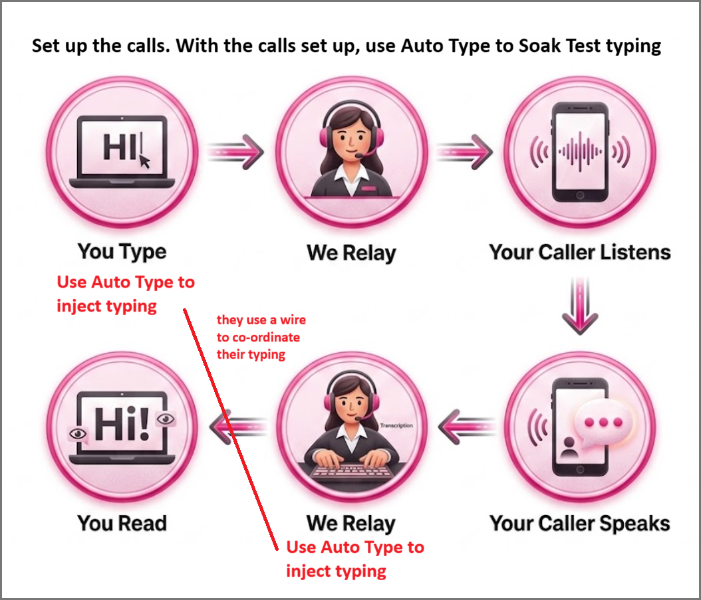
The App needed a slow stream of repeatable text to soak test it and fill up scroll buffers, over many minutes.
When I tried to get two devices to type together I wrote a simulation on a webpage:
Simplex, Duplex Full Duplex and Half Duplex are terms from telegraphy that are relevant.
Instead of using an Arduino to inject keystrokes as a keyboard, use the Arduino as a mouse to type on the soft keyboard.
https://docs.arduino.cc/built-in-examples/usb/KeyboardAndMouseControl/
For the keyboard version, the built in library converts letters to key presses.
I just had to read each letter from a string, and print each letter and pause. I had to work out how to hold off typing if the other device was typing.
If I want my sketch to act as a mouse, my sketch would need to map the letters onto positions on the soft keyboard and move the mouse.
Other people have used a delta-x robot and dabber.
They probably need to sse a camera to see where the mouse is on the smartphone screen. and detect if it has crashed.
A webcam could be used to look at the smartphone. I would need a machine vision system to say if the mouse is above a key to press.
The Arduino would need to be connected to the machine vision system.
All of this is a few orders of magnitude more complex than what I used in the picture above, which worked and I used a lot to soak test the app being tested. It found a number of useful bugs, that were fixed.
It is still worth exploring using the mouse. List the known solutions, and list what is manual and what could be automated.
solutions:-
All of this has been a bit of fun that uses devices brought to support a hobby interest in microcontrollers.