This page records more notes on work arounds to make measurements used when testing a smart phone app.
Automation is really difficult.
Another problem with automation is that the physical interfaces are difficult to automate to summarise down to events for asserts required for the test's pass / fail criteria.
SmartPhones? need a robot with a dabbler and some video and vision analysis to provide feedback. See
On a desktop PC, I could use JavaRobot?. It can move the mouse and press keys and capture the Apps screen running on a PC. I would have to use some vision recognition to convert the screen capture, to find the buttons and "understand" the screen image. The same java app running on a PC or linux were different slightly different.
Security also gets in the way. Windows has a way of automating key presses, but disables "CNTL-PrintScreen?" which would allow me to copy the screen, so I could paste it into a test record. It does not have a simple way of reporting what text and boxes are displayed. The automation software would still need and "AI" ability to understand what it is seeing.
Also you are not allowed to connect "non-approved" devices, and my automation tools are "non-approved" as I am inventing them as I develop them!
I brought a USB-A to lighting OTG cable dongle, that did not have the Apple chip it it, and it only worked for a minute or two before it was detected.
For a short while it was possible to buy the white dongle in the picture above, that allowed my Apple phones to be charged while I used my AutoTyping devices.
I could "measure" the current used by the App undertest, if I fully charged the device.
When the Smartphone device was fully charged, I could use the eBay sourced "USB Tester Digital Power Meter Tester Multimeter Current & Voltage Monitor" to report the current.
It went from 200mA to sometimes 900mA depending on how the App was opened.
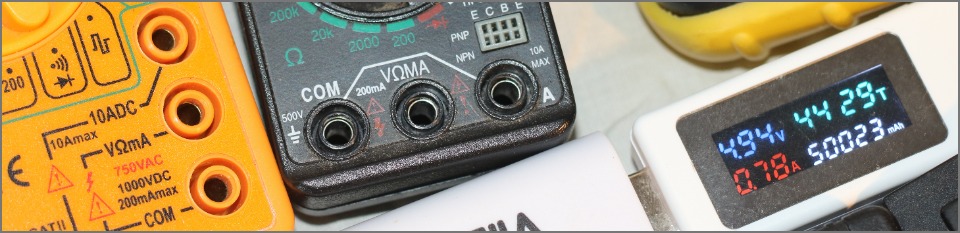
One of those laser guided thermometers was also used to measure the temperature of the back of the Smartphone. I could use my Raspberry Pi and a DS18S20 chip as well!
The Service used TextPhones?
It is possible to use modems.
The Service uses Textphones and Apps on Smartphones and laptops.
I now can generate modem squarks. These could be used to send text into the system.
https://www.dougrice.co.uk/cgi-bin/wiki.pl?WebAudio - Analyse samples captured using Audacity overview
http://www.dougrice.plus.com/dev/UART/UART2_V18.htm - Analyse samples captured using Audacity
https://www.dougrice.co.uk/webaudio/mic.htm - BAUDOT test tools
http://www.dougrice.plus.com/dev/UART/UART2_V18.htm#UARTgenerate - generate modem squarks
A USB modem can be used. On some devices, WebPages? can now control Serial Ports so I could write this page:-
https://www.dougrice.co.uk/webaudio/simpletermModemOne.html - There was a version with more buttons to trigger tests
Smartphone screens are difficult to read using an automation tool, but the App may provid call logs.
The AutoType can be be used to load up a call conversation log.
It is possible to analyse the saved call logs to look for missing text and issues.
The keyboard provides a stream of keystrokes. They do not get a stream of text about what is going on.
It may be possible to send commands to turn on and off the LED shift, Num lock.
I had to pause between sending each character, emulating what a human can type.
Sending multiple key presses in bulk, say 100 key presses as fast as the the Leonardo could type, was handled differently by Windows, Android and iOS.
When I printed the time stamp, I sent the string without pauses. It took extra effort to buffer the string and send it slowly.
Sending too fast found a feature in iOS that cause the Caret to be a character behind!
It might be possible to flow control a PS2 mouse by asserting a low, but that is history.
The Arduino Leonardo can emulate a Keyboard, Mouse and Serial USB devides all down the same USB cable.
The electrical inputs can be used to control the AutoTyper?.
It seems that it is now possible to change how the mouse sends the data between relative and absolute.
https://github.com/adafruit/Adafruit_CircuitPython_HID/issues/129
However, the mouse does not get a "haptic" signal when it goes over a feature on the GUI screen.
It was possible to use JavaRobot? to move the mouse and press keys. It could also capture an array of screen pixels.
You could program it up to look for edge detection.
As a GUI user, I recognise what is on the screen and move the mouse to the input area and can then press keys.
The keyboard
There are plenty of challenges to enjoy!